Manufacturers generate production data constantly. Machines start and stop, parts are produced, changeovers happen, downtime accumulates, and performance changes throughout every shift.
The problem is that many facilities still rely on people to collect, enter, reconcile, and distribute that information manually. By the time a spreadsheet or shift report reaches management, the conditions it describes may already have changed.
Automated production reporting reduces that delay by collecting production information directly from equipment and operational systems, organizing it automatically, and making current performance easier to understand and act on.
What Is Automated Production Reporting?
Automated production reporting is the process of collecting, organizing, and distributing manufacturing performance data automatically instead of relying primarily on manual recording and report preparation.
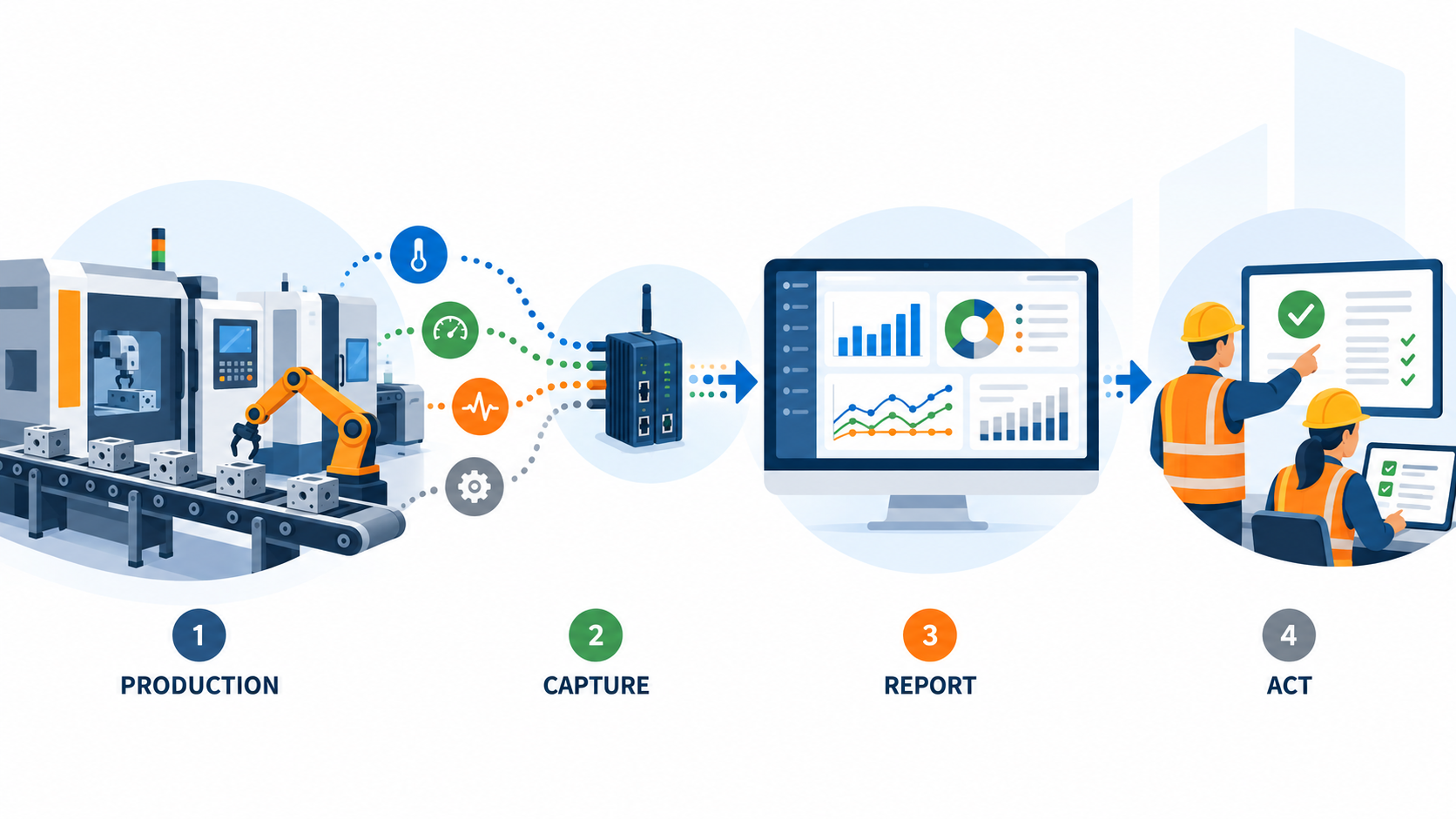
Depending on the production environment, that information may include:
- Production counts
- Machine running and stopped states
- Downtime duration
- Downtime reasons
- Cycle times
- Production rates
- Scrap or reject counts
- Shift performance
- Equipment utilization
- Overall Equipment Effectiveness (OEE)
Instead of waiting for an operator or supervisor to record everything at the end of a shift, an automated system can capture important production events as they happen.
That creates a stronger foundation for both immediate visibility and historical performance analysis.
Why Manual Production Reporting Creates Problems
Manual reporting can work at a basic level, but it becomes increasingly difficult as production environments grow more complex.
Common methods include paper logs, whiteboards, spreadsheets, shift-end forms, and supervisor summaries.
Reporting Is Delayed
Manual production information is often entered at fixed intervals, such as the end of a shift.
That means managers may be reviewing conditions that occurred hours earlier. A production problem that started early in the shift can continue much longer than necessary before anyone sees the pattern.
Short Events Can Be Missed
Operators naturally focus on keeping equipment running.
A 30-second stop, short jam, or quick reset may never make it into a manual log. When those interruptions occur repeatedly, the missing events can create a misleading picture of actual performance.
Manufacturers dealing with frequent short interruptions may also want to review how micro downtime affects OEE and throughput.
Manual Entry Can Be Inconsistent
Different employees may describe the same event differently.
One operator may classify a stop as a mechanical problem while another records the same type of event as a material-feed issue.
Over time, those inconsistencies make trend analysis less reliable.
Report Preparation Takes Time
Someone has to collect the numbers, enter them, reconcile inconsistencies, prepare the report, and distribute it.
As the number of machines, shifts, products, and production lines increases, that administrative work can become significant.
Automation reduces the reporting burden so production teams can spend more time interpreting what happened and deciding what to do next.
How Automated Production Reporting Works
The technology varies by facility, but the basic process is straightforward:
Machine or Production Signal → Data Capture → Storage → Reporting → Operational Action
1. Production Data Is Captured
Information may come from:
- PLCs
- Machine controls
- Sensors
- Counters
- Dedicated monitoring devices
- Operator inputs
- Other production systems
The goal is to capture important events consistently rather than depending entirely on someone remembering to record them later.
2. Production Events Are Given Context
Raw machine signals alone are rarely enough.
A reporting system may associate events with information such as:
- Machine or line
- Shift
- Product
- Operator or crew
- Downtime category
- Production target
- Scheduled production time
That context turns machine activity into information that production teams can actually use.
3. Reports and Dashboards Are Generated
Once the information is collected and organized, reports can be produced automatically.
Manufacturers may be able to view performance:
- In real time
- By shift
- By day
- By machine
- By production line
- By product
- Across departments
- Across facilities
Reports may also be scheduled or generated on demand.
A useful reporting system should emphasize the metrics that support real decisions rather than displaying every available number. Thrive’s guide to building a practical manufacturing KPI dashboard explores that in more detail.
What Should Automated Production Reports Track?
There is no single set of metrics every manufacturer needs.
The right information depends on the production process and the decisions the report is intended to support.
| Reporting Area | Example Information |
| Production output | Actual units vs. planned units |
| Machine status | Running, stopped, idle |
| Downtime | Duration, frequency, reason |
| Performance | Production rate, cycle time |
| Quality | Good units, rejects, scrap |
| Shift performance | Output and losses by shift |
| OEE | Availability, Performance, Quality |
| Trends | Performance over time |
A plant manager may need a different view from a maintenance manager or line supervisor.
The goal is not to collect as much data as possible, but to give the right people reliable information they can use to improve production.
Automated Reporting vs. Real-Time Production Monitoring
These concepts are closely related, but they serve different purposes.
Real-time production monitoring focuses on what is happening right now.
For example:
- Is the line running?
- Has a machine stopped?
- Is production falling behind target?
- Has an unusual condition appeared?
Automated production reporting organizes both current and historical information so teams can compare performance across shifts, machines, products, and longer periods.
Real-time monitoring helps teams respond quickly.
Reporting helps teams understand performance and compare results.
Manufacturers often benefit from both. Thrive’s guide to real-time production monitoring focuses more specifically on the immediate visibility side of production management.
Automated Production Reporting and Downtime Tracking
Production output and downtime should not be treated as completely separate datasets.
If a line produces fewer units than expected, managers need to understand what contributed to the loss.
Was the line stopped?
Was it running below its expected rate?
Did repeated short interruptions reduce throughput?
Did one failure account for most of the lost production?
This is where automated reporting becomes much more useful when combined with machine and equipment downtime tracking.
Instead of reporting only that production missed its target, teams can connect the result to the events that contributed to it.
From Production Reports to Better Decisions
Automating a report does not automatically improve performance.
The value comes from using the information to identify losses and guide action.
A useful reporting process might follow this cycle:
Measure → Compare → Identify Loss → Investigate → Correct → Measure Again
For example, a production report may show that one line repeatedly misses its target on the second shift.
A deeper review may reveal that the same equipment experiences recurring material-feed interruptions.
That gives the team something specific to investigate.
Historical reporting is especially useful because it helps distinguish isolated events from persistent problems. Thrive’s guide to manufacturing downtime data analysis explains how recurring downtime data can be used to identify patterns and prioritize improvement opportunities.
What to Look for in an Automated Production Reporting System
When manufacturers evaluate a reporting system, several capabilities matter more than simply whether it can generate a report.
Look for:
- Automatic data collection from machines or production systems
- Production and downtime visibility in a single reporting environment
- Flexible reporting by machine, line, shift, product, or other useful dimensions
- Historical trend analysis for comparing performance over time
- Integration and export options where data needs to connect with other systems
- Ease of use and scalability so the system remains practical as production needs grow
The best fit depends on the facility, the existing equipment, and the decisions production teams need to make.
Automated Reporting Should Make Production Easier to Understand
Automated production reporting should do more than replace a spreadsheet.
It should reduce the effort required to reconstruct what happened during a shift while making production performance easier to understand and act on.
The real value comes from answering practical questions:
- Where are we losing production?
- Which problems keep returning?
- Which machines or shifts perform differently?
- Are corrective actions working?
- Where should improvement efforts be focused next?
Once that information is available consistently, production reporting becomes less about preparing reports and more about improving performance.
Manufacturers ready to move beyond manual reporting can learn more about Thrive’s production reporting system and how it combines production visibility, downtime tracking, and performance reporting.